
Rate Modifier will allow for extra differentiation in a rate line, based on an attribute of the shift. Using modifiers requires some custom work and adding them into dedicated Salesforce objects.
For instance, if you want to use an attribute from the site or the contact, you can add a formula filed to the shift and then use that as a modifier. The result will be that any line in the rate card could be split into lines with other rates based on those modifiers.
Weekends are Saturday and Sunday, from midnight to midnight
Weekdays are Monday to Friday, from midnight to midnight
At the bottom of the Rate Card page there is a section that should show which objects are connected to it.
Rate Cards are typically used at the Job Role level, though it can also be used at Placement, Job Type, Contract and Account level. If no Rate Card is defined for the Job Role, the Payroll Calculation will continue looking for one.
Yes, though if the shifts starts on Sunday before midnight, you can set the rate by the start time.
Sites do not use Rate Cards directly. Rate Cards are defined at the Job Role.
They could be filtered on a Rate Card Page by using a Condition or a Rate Card Modifier.
How can I avoid Rate cards from being required when fill in a Requirement form in scheduling?
Go to Sirenum Global custom settings and untick the box for the custom setting field called ‘Use named rate cards’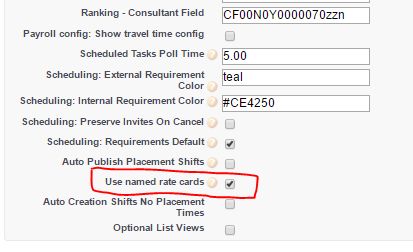
If a Break Definition has been defined, when running payroll there will be two timesheet lines for the shift. One timesheet line before the break occurred and the second timesheet line after the break has been completed. It is important to pay close attention to the scheduled times as the second timesheet line will have the break amount deduced.
This could be the result of a duplicate account.
The Contact could have been connected to the wrong duplicate account. It is recommended that the duplicate account is changed to identify it is a duplicate, then update the contacts that have been assigned to the duplicate account.
One of the reasons why the Rate Line is not being used is because the Special Date has not been updated to the recent year.
Another cause could be that another Rate Line is being used instead due to conditions meeting that Rate Line. Remember for Rate Lines they are read from bottom to top. It might be worth moving the Rate Line lower in the list.
Yes, cancelled shifts are ignored when generating timesheets and you wont get shifts that have been cancelled added to the hours on the timesheet.